

What Is a USB Duplicator?
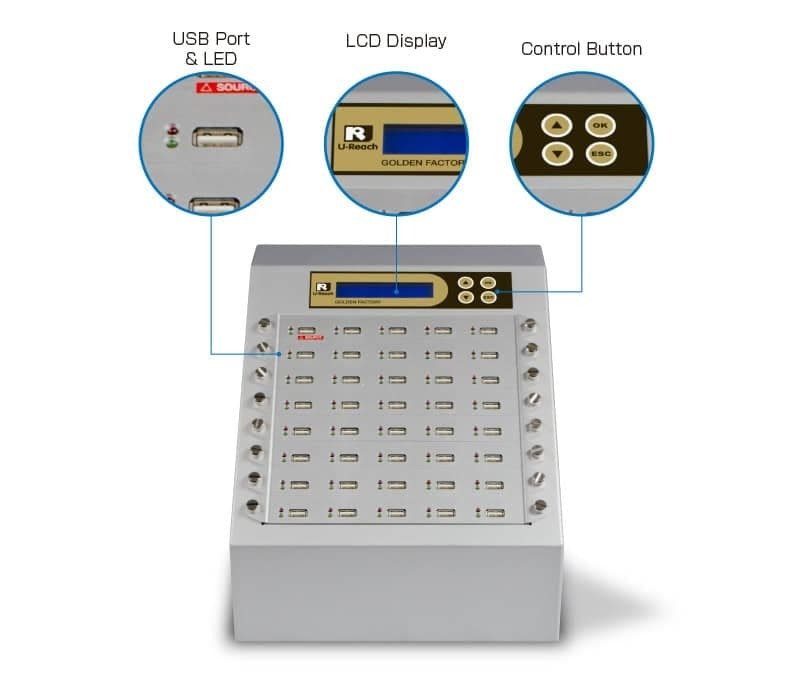
A USB duplicator is a standalone hardware device that copies data from one USB flash drive to multiple target drives simultaneously, without requiring a computer. You insert a master USB drive into the source port, place blank drives into the target ports, and the duplicator creates exact copies at hardware-level speeds.
Unlike copying files through a computer — which is limited by USB hub bandwidth, operating system overhead, and the time it takes to manage each drive individually — a standalone duplicator uses direct hardware access to achieve significantly faster speeds and produces consistent, verified results every time.
Who Uses USB Duplicators in Canada?
Government and Military
Canadian federal departments, provincial agencies, and the Department of National Defence use USB duplicators for secure software distribution, firmware updates, and standardized deployment across facilities. When drives need to be retired, the built-in sanitization functions provide CSEC ITSG-06 and NIST 800-88 compliant erasure.
Healthcare
Hospitals, clinics, and health authorities distribute patient management software, medical device firmware, and training materials on USB drives. PIPEDA and PHIPA compliance require that any USB drives containing patient data be properly sanitized before reuse or disposal — a function built into every U-Reach duplicator.
Education
Universities, colleges, and school boards across Canada use USB duplicators to distribute course software, lab images, and examination content. A 1-to-23 duplicator can prepare an entire classroom set of drives in minutes rather than hours.
Manufacturing and Industrial
Automotive plants, electronics manufacturers, and industrial facilities use USB duplicators to load firmware, configuration files, and diagnostic tools onto USB drives that connect to production equipment. Canadian manufacturers including those in the automotive sector in Ontario and the tech corridor in British Columbia rely on duplicators for consistent, high-volume deployment.
IT Asset Disposition (ITAD)
ITAD companies processing retired IT equipment need to sanitize USB drives before resale or recycling. USB duplicators with built-in erase functions process drives in bulk, generating logs that document compliance with PIPEDA disposal requirements.
Key Features to Evaluate
| Feature | Why It Matters | What to Look For |
|---|---|---|
| Port Count | Determines how many drives you can copy or erase at once | Available in 1:7, 1:15, 1:23, 1:39, and 1:59 configurations |
| Copy Speed | Affects throughput for high-volume operations | Up to 33GB/min in Turbo models; standard models at 1.5GB/min |
| USB Standard | Must match your drive types | USB 2.0, USB 3.0/3.1, and USB-C options available |
| Sanitization | Required for PIPEDA/ITSG-06 compliance | Quick Erase, Full Erase, DoD 5220.22-M, and NIST 800-88 modes |
| Copy Modes | Different jobs need different approaches | Whole Media, Quick Copy, Difference Copy, and Copy+Compare |
| Logging | Audit trail for compliance | iSecureLog serial output for generating Certificates of Destruction |
| Physical Size | Workspace and portability requirements | Compact desktop units to rack-mountable production systems |
How to Choose the Right USB Duplicator
Step 1: Determine Your Volume
Be realistic about your daily throughput. If you process fewer than 50 drives per day, a 1-to-7 or 1-to-15 model provides excellent performance in a compact form factor. For 50-200 drives per day, a 1-to-23 model is the sweet spot. For high-volume production environments exceeding 200 drives per day, 1-to-39 or 1-to-59 models minimize cycle time.
Step 2: Match Your USB Standard
If your drives are USB 3.0 or USB 3.1, you need a duplicator with USB 3.0+ ports to take advantage of the faster transfer speeds. Using USB 3.0 drives in a USB 2.0 duplicator will work, but at USB 2.0 speeds. If you work with USB-C drives, look for models with USB-C port support.
Step 3: Consider Sanitization Needs
If your organization handles sensitive data under PIPEDA, PHIPA, or government security classifications, prioritize models with built-in multi-pass erase functions and logging output. The log output connects to a printer or computer to generate Certificates of Destruction for your audit records.
Step 4: Evaluate Speed Requirements
Standard duplicators operate at 1.5 GB per minute, which is suitable for most operations. Turbo and Ultra Speed models can reach up to 33 GB per minute, which makes a meaningful difference when you are cloning drives with large images (32GB or 64GB USB drives).
Why Buy from a Canadian Supplier?
Purchasing your USB duplicator from U-Reach Canada offers several practical advantages over ordering from a US supplier:
-
- Native CAD pricing — no exchange rate surprises on your purchase order
- No customs duties, brokerage fees, or cross-border shipping delays
- Canadian warranty service and technical support during Canadian business hours
- Understanding of Canadian compliance requirements (PIPEDA, ITSG-06, provincial privacy laws)
- Support for government purchase orders and net-30 terms for qualifying Canadian organizations
- Shipping from within Canada with faster delivery times nationwide
Get a USB Duplicator Quote
U-Reach Canada carries the full range of USB duplicators and sanitizers, from compact 7-port desktop units to 59-port production systems. Every model includes built-in data sanitization functions and is backed by Canadian warranty and support.
Browse our USB Duplicators & Sanitizers collection or call our Canadian team at 877-987-3224 for help selecting the right model for your operation. We offer government pricing and educational institution discounts for qualifying Canadian organizations.